From Training Diary to Digital Log: How Practice Records Changed
A training diary to digital log shift changes what athletes notice and remember; learn how paper and apps shape useful records of practice.
What changes when a training diary becomes a digital log? The training diary to digital log shift is not simply paper replaced by a screen: each format makes certain details easier to capture, revisit and overlook. A notebook can preserve the feel of a session in your own words; an app can sort entries and place them side by side. The record is still a record of practice, but its shape influences what returns to mind.
What did early training diaries record?
Before a phone could hold a training calendar, athletes and coaches used notebooks, wall charts, club books and loose sheets. Their contents varied with the sport and the writer. A runner might note a route, weather and how a session felt; a swimmer could mark sets beside a pool timetable; a coach might record attendance and drills in a team ledger.
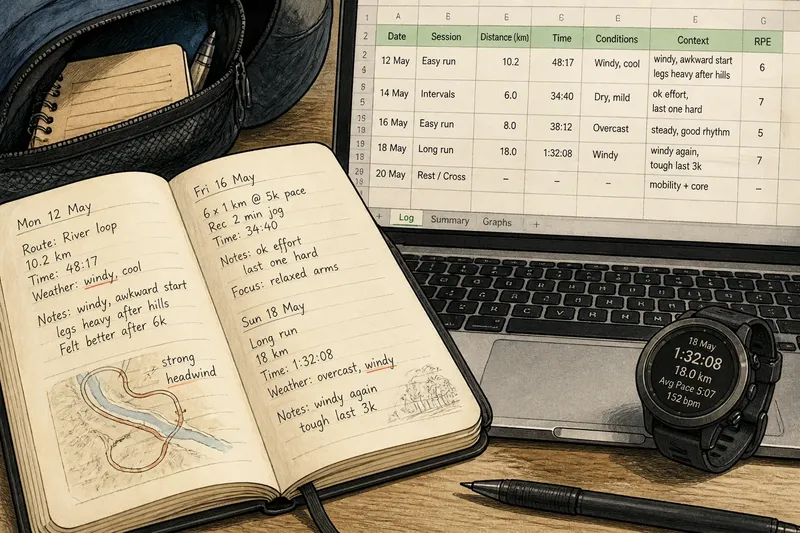
Handwriting naturally favoured short, personal notes. A date, a few figures, and a sentence such as “legs heavy after hills” could be enough to help the writer recall the day. The page also allowed a sketch, an arrow or a comment in the margin without choosing a data field first. That freedom made the diary adaptable, though it could leave different sessions hard to compare.
Paper records were often private objects, stored in a kit bag, desk drawer or club cupboard. Their order depended on the owner: entries could be chronological, grouped by event or scattered across pages. Looking back meant turning pages and recognising a phrase or date. The effort could make rereading deliberate, but a missed entry was easy to miss again.
Why did digital logs take hold?
Digital records became appealing as phones, spreadsheets and sport-specific software made storage and retrieval less dependent on a single notebook. A spreadsheet could keep dates in a consistent column; a calendar app could attach a session to a day; a training platform could combine notes with routes or device data. These tools made it easier to search and view a record across time.
The shift also changed what counted as an entry. A handwritten note begins with what the athlete chooses to say. A digital form may prompt for duration, distance, effort, mood or equipment, while a connected watch may add information automatically. That can help someone remember a session’s outline, but the form’s available fields can quietly set the boundaries of attention.
Digital logs are not one thing. A plain note-taking app resembles a pocket notebook with search. A spreadsheet offers custom columns and sorting. A dedicated training platform may connect sessions, schedules and device imports. The right format depends on whether the reader wants free-form reflection, easy comparison, or a record linked to other tools.
What becomes easier to notice?
Digital logs make patterns easier to retrieve when entries use consistent labels. Searching for “wind”, “serve” or “sleep” can bring related notes together, while a spreadsheet can arrange sessions by date or type. A paper diary can reveal the same pattern, but usually asks the reader to do more of the searching by hand.
That convenience favours what can be named and sorted. A graph may make a rising workload visible while leaving out the context that made a session feel unusual. A written note can preserve that context—an unfamiliar surface, a crowded lane, a disrupted warm-up—but may not fit neatly into a chart. Neither view is complete on its own.
Automatic capture adds another distinction. A watch or cycling computer can record certain session details without requiring the athlete to write them down. This reduces manual entry, yet it does not explain why the session went as it did or whether the recorded information matters to the person reviewing it. The athlete still decides what deserves interpretation.
Imagine a fictional club runner who moves from a pocket notebook to a spreadsheet. In the notebook, she has written “windy, awkward start” beside several route days, but the phrases are spread across pages. In the spreadsheet, she adds a short context column and searches for “windy”; the repeated circumstance becomes easier to see alongside the session notes, without pretending that one detail explains every result.
What remains easier to remember on paper?
Writing by hand can encourage a pause between finishing a session and recording it. The athlete has to decide what to put on the page, which may prompt a concise account in personal language. A notebook also keeps an entry visually close to the surrounding days: the writing, gaps and margin notes show how the record developed.
Paper can feel less demanding than a detailed app form. There is no menu to navigate, no notification to dismiss and no need to choose from a list of preset moods. A small notebook can be opened anywhere, including places where phone use is awkward. Its limitations are just as concrete: pages do not search themselves, and an untidy system can make older entries difficult to locate.
Digital records can support memory in different ways. Search, tags and calendar views help retrieve an old session, while reminders can prompt someone to write a note before details fade. Yet a dense dashboard may put more information on screen than the athlete can use. Easy storage is not the same as meaningful recall.
How should you choose a format?
Start with the moment you want the record to serve. If the main purpose is to remember how a session felt, a notebook or plain notes app may be enough. If you regularly compare similar sessions, a spreadsheet or structured log can make those entries easier to bring together. If device data already forms part of your routine, a platform that accepts imports may reduce duplicated typing.
- Choose paper when handwriting, sketches or quick margin notes matter more than search.
- Choose a notes app when you want flexible text that is easy to find across devices.
- Choose a spreadsheet when a few consistent fields and sortable entries answer your questions.
- Choose a training platform when its session view fits your sport and the information you actually review.
- Use a hybrid when a paper reflection adds context to a digital record you already keep.
Keep the structure proportionate. A long form can turn recording into a second workout, while a single vague line may not help you remember much later. Pick a small set of prompts that suit your purpose—for example, session focus, one notable condition and a short reflection—and leave space for an unexpected detail.
How can you move old records?
There is no need to retype an entire paper archive just because a new app is available. First decide what you want to recover: a run of recent sessions, notes about a particular skill, or a longer view of practice. Select entries that serve that question, and preserve the original notebook so its wording and surrounding context remain available.
For a small selection, a typed summary can be clearer than a literal transcription. Keep the original date where it is known, retain distinctive phrases that carry useful context, and mark uncertain details as uncertain rather than filling gaps from memory. If a digital tool supports attachments, a photograph of a page can preserve handwriting, although it may not make the text searchable.
Before settling on a platform, consider how you would retrieve or export your entries if your needs change. A record that is easy to enter but difficult to access elsewhere may become awkward to maintain. Check the tool’s own settings and documentation for its available export and privacy options.
Which format answers your question?
Is a training diary the same as a training log?
The terms overlap, but “diary” often suggests a dated personal account, while “log” can imply consistent fields and easier comparison. In practice, a notebook can be highly structured and a digital log can be mostly free-form. The useful distinction is how you expect to review the entries.
Do digital logs improve training by themselves?
No format makes a practice decision for you. Digital tools can make some records easier to sort or retrieve, but their value depends on whether the information helps you reflect and communicate about your sessions. A simple record that you revisit can be more useful than a crowded dashboard you rarely open.
Can a paper diary work alongside an app?
Yes, if each has a clear job. You might keep a short reflection on paper and enter only the details you want to compare in an app, rather than copying every line twice. Decide which version is the main record so that later you are not left wondering which entry is current.
What should you write after practice?
Record the details that will help you recall the session later: what you worked on, a condition that shaped it and a brief note about how it felt or what stood out. Keep wording concrete enough to recognise, such as “serve rhythm felt rushed on the outdoor court”, rather than relying on a bare label like “bad”.
What should a record preserve?
A useful training diary to digital log does not have to capture everything. Its job is to leave a readable trace of practice: enough structure to find a session again, with enough personal context to remember what the fields cannot explain. Paper tends to make free-form observation immediate; digital tools tend to make stored information easier to search and arrange.
Before adding another metric or prompt, ask what future question it would help you answer. If you cannot picture a reason to return to that detail, it may be clutter rather than memory. The best record is the one whose format helps you recognise what happened without confusing a tidy display for the whole story.